


Pumply - Pumplog Tracker
4.7334.00 Reviews
App Specs
- Version
- 5.6
- Updated On
- License
- Free
- Downloads
- 50,000+
- Developer
- Northlight Studio
- Categories
- Parenting
- Platform
- Android
Screenshots
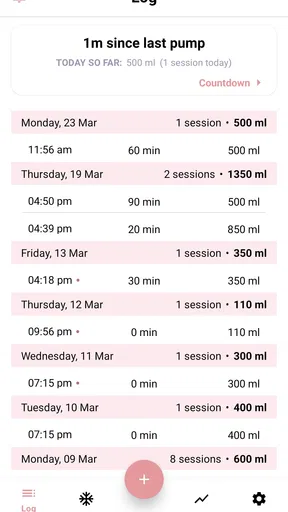
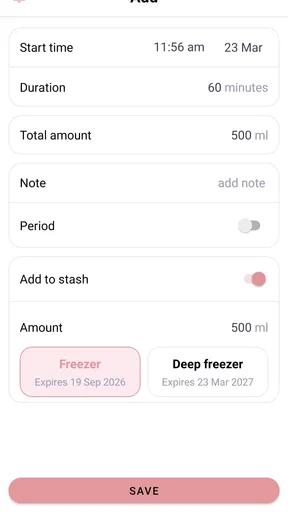
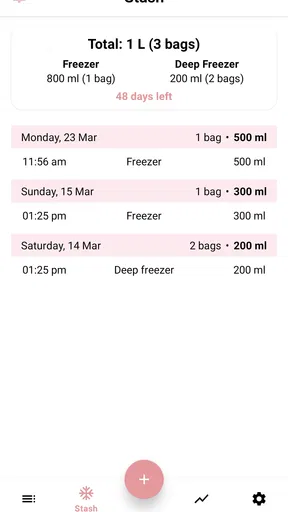
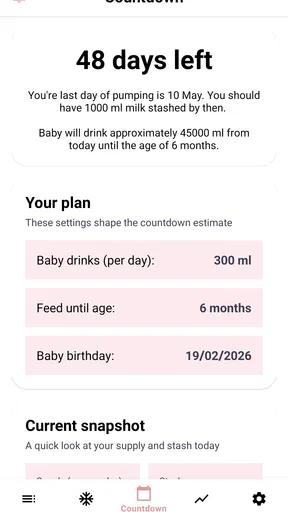
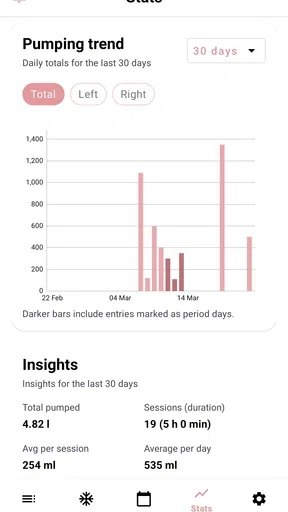
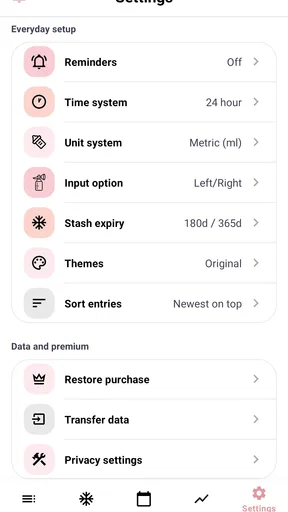
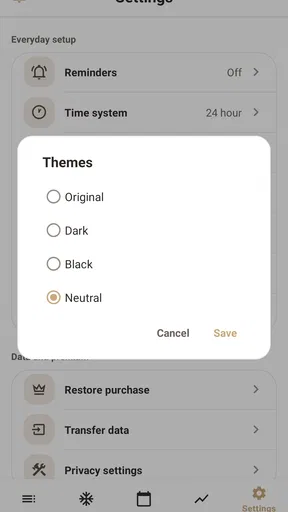
 Analysis by AppCompare
If you are exclusively pumping, the hardest part is often not the pumping itself. It is remembering when a session started, which side you used, how much you expressed, and whether today’s total is moving in the direction you expected. Pumply - Pumplog Tracker is a parenting app built around that narrow but important problem. I found it most useful as a simple record-keeping companion rather than as a source of medical advice or a complete infant-care system.
That focus is its main appeal. Instead of asking you to manage feeding, sleep, diapers, growth, and pumping in one crowded dashboard, Pumply concentrates on sessions, volumes, and totals. The result is easier to understand when you are tired and holding a baby in one arm. My overall impression is that it can remove a lot of mental arithmetic from the day, provided you are comfortable entering information consistently and do not expect it to replace guidance from a lactation consultant or healthcare professional.
What to expect from this focused parenting app
Pumply is free to download and is aimed at everyone, which makes the basic idea approachable for new parents. Northlight Studio developed it specifically around exclusive pumping, so the app feels more purposeful than a general notes app. It is available for devices running Android 8.0 or later, and the current version is 5.6. Optional in-app purchases range from $5.99 to $24.99 per item, so I would check what is included in the free experience before treating it as a long-term paid tool.
The app has built a strong reputation in its category, with a 4.7 average from around 1.7 thousand ratings and over 50 thousand installs. Those numbers do not tell me whether it will fit every pumping routine, but they do suggest that the straightforward tracking approach resonates with many parents. I would still judge it by your own workflow: a tracker is only useful when recording a session takes less effort than trying to remember it later.
The first thing I would not expect is a sophisticated medical interpretation of your output. A log can show patterns, but it cannot explain every change in supply, diagnose pain, or tell you whether a particular amount is right for your baby. I use this kind of app to create a reliable history that I can discuss with a professional if needed, not to make health decisions in isolation.
It is also worth deciding what you want to learn from your records. If your goal is simply to know the day’s total, Pumply can keep that question from becoming a guessing game. If you want a broad family organizer with vaccination reminders, sleep analysis, developmental milestones, and shared household tasks, a larger baby-tracking app may be a better match, even if its pumping screen is less focused.
Setting up a routine that survives tired mornings
My advice for a first-time user is to keep the initial setup deliberately small. Do not begin by trying to reconstruct every session from memory. Start with the next pumping session and decide what information you can realistically enter every time. The best tracking system is not the one with the most detail; it is the one you will still use during a middle-of-the-night session.
Worth Reading Before You Choose

EA SPORTS FC Mobile 26 Is a Bigger Football Game, but It Takes Time

Flipboard Shows What News Apps Must Do Beyond the Feed

Switching to Android Auto Means Rethinking Your Driving Routine

Google Calendar Makes a Crowded Week Easier to Manage

Ludo King Makes the Most of the Minutes Between Plans

Baby Panda World Brings Quick Play to Modern Phones, but Its Game Library Feels Busy
Before you begin, place your phone where you normally pump and make the app part of the same routine as connecting the pump. If you usually sit in one chair, keep the device nearby. If you move around the house, choose one consistent moment for recording, such as immediately after storing the milk. This small decision matters because delayed entry creates the exact uncertainty the app is meant to remove.
I would also establish a simple rule for interrupted sessions. For example, if the baby needs you halfway through, record the part you completed before moving on, then decide whether the later pumping belongs to the same session or a separate one. Consistency is more valuable than pretending the day was perfectly organized. A clear personal rule makes your totals easier to interpret later.
Another useful preparation step is to decide how you will handle estimates. You may sometimes be able to enter an exact volume, while other times you may be rushing or working with a container that is difficult to read. Rather than skipping the entry entirely, make a note of whether it was approximate if the app’s available fields allow you to do so. A nearly complete record is often more useful than a perfect record with large gaps.
Because Pumply is centered on pumping rather than the whole household, I would not force it to become a diary for everything else. Keep unrelated notes elsewhere unless they directly help you understand your pumping routine. This separation reduces clutter and makes it easier to open the app for one purpose: recording what happened.
The first successful action: record one complete session
The quickest way to understand the app is to use it for one ordinary session from beginning to end. Open it when you are ready to pump, enter the session details the interface requests, and save the result while the information is still fresh. Then look at the daily total rather than trying to analyze a trend immediately. That first total is not a verdict on your supply; it is simply proof that your record is working.
A realistic example is a busy morning after a broken night. You pump while the baby naps, but you are unsure whether you started before or after breakfast and you cannot remember the previous evening’s amount. With Pumply, the practical win is not a dramatic insight. It is having one place to record the morning session and add it to the day’s running picture instead of relying on a note in your phone, a paper scrap, or memory.
For the first few entries, pay attention to the time and volume fields rather than trying to create a complicated routine. After several sessions, the totals become more meaningful because they are based on your own repeated entries. This is one of the app’s quiet strengths: it can turn scattered moments into a record you can review without doing addition by hand.
I recommend recording immediately after the session if starting the timer or entering details beforehand feels inconvenient. Parents often assume a tracker must be used in one exact way, but the more important habit is completing the entry. A short, reliable action after pumping is better than an ambitious process that breaks whenever the day becomes unpredictable.
One non-obvious benefit of this approach is that it can expose where your routine fails. You may discover that you remember the volume but forget the time, or that you regularly postpone entries during the afternoon. That is useful information about your workflow, not a personal failure. Adjust the recording moment instead of blaming yourself for an incomplete log.
How to read totals without turning them into pressure
Daily totals are easy to misunderstand, especially when you are already worried about supply. I treat them as observations, not grades. A lower total on one day may reflect timing, an interrupted session, a difficult day, or an incomplete entry. The value of tracking appears when you can compare a consistent series of records, not when you react to one number.
For that reason, I would avoid checking the total repeatedly during the day. Constantly refreshing can turn a practical tool into another source of anxiety. A better workflow is to review it at a chosen point, perhaps after the last planned session, and then look back over several days when you need a broader view.
Another useful habit is separating “what happened” from “what I think it means.” The app can help you preserve the first part. The second may require context that a simple pumping log cannot provide. If you notice a concerning pattern, bring the record to a qualified professional rather than trying to diagnose the cause from the chart or total alone.
There is also a storage and planning angle. A running record can help you remember how much you expressed during a shift, before leaving the house, or when preparing bottles. I would use it as a planning aid, while still checking the actual containers and following safe milk-handling guidance. The app can organize your entries, but it does not physically verify what is in the refrigerator or freezer.
Common confusion during the first week
The most likely confusion is expecting the app to know what happened without an entry. Pumply is a tracker, not an automatic measurement system. If you forget to log a session, the total will reflect the information entered, not the complete reality of your day. That sounds obvious, but it is easy to blame the app when the real issue is a missing record.
A second point is the difference between a pumping session and a feeding event. Exclusive pumping often involves expressing milk, storing it, and later giving it to the baby. Those are related but separate moments. If your main question is “how much did I pump?”, Pumply’s focused design makes sense. If your main question is “when and how much did my baby eat?”, you may need a broader tracker or a separate method for feeding records.
You may also wonder whether you should enter every tiny expression or only planned sessions. There is no single routine that suits everyone. If small additional sessions matter to your daily total, record them consistently. If entering them creates so much friction that you stop logging altogether, simplify your approach. The trade-off is between precision and sustainability, and I would choose the level of precision you can maintain on your hardest day.
Another practical issue is switching between devices or changing your routine while traveling. Before relying on any tracker for an important appointment, make sure you know how you will access the records you need and whether your usual device is available. I would not wait until a stressful consultation to discover that the information you want is difficult to locate. Review your recent entries while you are calm and decide what you would actually show a professional.
The purchase model may raise questions as well. Since the app is free but offers individual in-app purchases from $5.99 to $24.99, I would explore the basic workflow first. Use it long enough to determine whether entering sessions feels natural before paying for extras. A paid option can be worthwhile if it removes a genuine obstacle, but it should not be assumed necessary simply because it appears in the app.
Where it beats notes, spreadsheets, and larger baby trackers
A notes app is flexible, but that flexibility becomes work. You have to create your own format, calculate totals, and keep entries consistent. A spreadsheet offers more control, yet it can feel absurdly elaborate when you are trying to record a session one-handed. Pumply’s advantage is that it is designed around this one repeated task, so the path from opening the app to seeing your pumping record is shorter.
Compared with an all-in-one baby tracker, the trade-off is focus. A larger app may be better if you need feeding, sleep, diaper, medication, and growth information in one place. Pumply is more attractive when those extra categories would distract you and your priority is exclusive pumping. I would rather use a focused tool well than install a huge system that I rarely update, but families who need shared, comprehensive records may prefer the broader alternative.
Paper logs still have a place, particularly for someone who wants zero screen time during overnight sessions. They can be fast and reassuringly simple, but totals require manual arithmetic and pages can be misplaced. Pumply is the better choice when you want the convenience of a digital running record. A paper backup may be sensible during travel or when your phone is unavailable, but I would choose one primary system to avoid duplicate or conflicting entries.
The app’s narrow purpose also makes it easier to explain to someone helping you. A partner or family member does not need to understand an entire baby-care dashboard to see that the day’s pumping record has been updated. That can be useful when another person is handling bottle preparation or helping you remember what still needs to be done.
Three habits that make the log more useful
First, create a “record before reset” rule. Before washing parts, putting away milk, or leaving the pumping area, complete the entry. This links the log to the physical end of the session and reduces the chance that a later interruption erases the details from your memory.
Second, review patterns at a fixed interval instead of reacting to every change. A short review after several days can reveal whether your missing entries happen at a particular time or whether your schedule is simply too ambitious. This is more actionable than staring at one total and wondering whether it is meaningful.
Third, use the app to prepare questions, not conclusions. If you are meeting a lactation consultant, you can use your record to identify what you want to ask: whether a repeated change is worth discussing, whether your schedule is sustainable, or whether a certain part of the day is consistently difficult. The log becomes a communication aid rather than a substitute for care.
One further trade-off is detail versus emotional comfort. Some parents feel calmer when every session is documented; others become more anxious when each number is visible. If tracking increases your stress, reduce how often you review totals or consider whether a simpler paper routine would serve you better. An app should support your care routine, not dominate it.
Who should choose Pumply, and who should skip it?
I would recommend Pumply to a parent who is exclusively pumping, wants a dedicated record, and values quick access to session volumes and totals. It is especially suitable if manual addition has become annoying or if you keep losing track of entries across notes, messages, and scraps of paper. The focused design can make a demanding routine feel more orderly without requiring you to learn a full family-management platform.
I would be more cautious if you are only pumping occasionally and do not care about totals. In that situation, a simple note may be faster. I would also look elsewhere if your main need is a complete baby-care history, detailed collaboration with multiple caregivers, or medical interpretation. Pumply’s strength is its limited scope, and that same limitation makes it less suitable for families seeking an all-purpose organizer.
The age rating of Everyone makes it broadly approachable, but parents should still think about privacy and device habits in their own household. Keep your phone secured in the way you normally use for personal information, and avoid treating any app record as a replacement for professional documentation when a clinician asks for specific details.
A reassuring next step after installation
My suggested first-day plan is simple: install Pumply, enter the next complete pumping session, check that the total reflects it, and stop there. You do not need to build a perfect history before the app becomes useful. On the following day, repeat the same process and notice whether the recording moment feels natural or needs to move to another part of your routine.
After you have a dependable habit, decide whether you need more detail or whether the basic record is enough. If you are satisfied with a clear session history, keep the workflow uncomplicated. If you are considering an in-app purchase, wait until you can name the specific problem it would solve. That approach keeps the app practical rather than turning it into another project.
In my experience, the best reason to try Pumply - Pumplog Tracker is not that it promises to make exclusive pumping easy. No tracker can remove the physical and emotional demands of that routine. Its real value is more modest and more believable: it gives you a dedicated place to record what you already did, see the day’s total, and arrive at a conversation with better information.
That makes it a good fit for first-time users who want a focused starting point and a poor fit for anyone expecting a complete parenting command center. If you begin with one session, use a repeatable recording habit, and keep the numbers in perspective, the app can become a quiet piece of support in an otherwise busy day.
Pros
- Quickly logs sets
- reps
- weights
- and rest times during workouts.
- Progress charts make strength improvements easy to monitor over time.
- Exercise library helps beginners build structured training sessions.
- Custom routines support different goals
- schedules
- and training styles.
- Simple interface keeps workout tracking focused with minimal distractions.
Cons
- Some advanced tracking tools may require a premium subscription.
- The exercise database may not cover every specialized movement.
- Manual entry can feel repetitive during fast-paced training sessions.
- Limited social features may disappoint users seeking community motivation.
- Battery or notification use could increase during extended workout sessions.
FAQs for Pumply - Pumplog Tracker
What is Pumply - Pumplog Tracker used for?
Pumply - Pumplog Tracker is designed to help users record, organize, and review pumping sessions in one place. It can be useful for monitoring details such as session times, duration, breast used, and output, depending on the features available in your version. Keeping this information together may make it easier to notice routines and share helpful summaries with a healthcare professional when needed.
Is Pumply - Pumplog Tracker suitable for tracking breastfeeding and pumping routines?
The app is primarily focused on logging pumping-related information, so it may be helpful for parents who want a simple digital record of their routine. It should not be treated as a medical diagnostic tool or a replacement for professional advice. Every feeding journey is different, and users should consult a doctor, lactation consultant, or other qualified specialist if they have concerns about supply, feeding, discomfort, or their baby’s health.
Does Pumply - Pumplog Tracker work without an internet connection?
Basic logging applications often allow entries to be created while offline, but the exact offline behavior can depend on the current app version and device settings. Before relying on it during travel or in areas with poor reception, test whether sessions can be saved and viewed without an internet connection. Features such as synchronization, backups, account access, or advertisements may require connectivity.
What information can I record in Pumply - Pumplog Tracker?
Pumply - Pumplog Tracker is intended to keep pumping records, which may include the date and time of a session, its duration, the side used, and the amount expressed. Available fields can vary between updates or platforms. Before downloading, review the app listing and permissions to confirm that the tracking options match your needs, especially if you want detailed notes, reminders, history, or progress summaries.
Is my personal and pumping data private in Pumply - Pumplog Tracker?
Because pumping logs can contain personal health-related information, privacy is an important consideration before using any tracking app. Check Pumply’s privacy policy and the permissions requested on its Google Play or App Store listing. Pay attention to whether data may be stored locally, synchronized online, shared with service providers, or used for analytics. Avoid entering information you are uncomfortable storing digitally, and use device security whenever possible.


